Replication Status Page
The second page of the CygNet Redundancy Dashboard is the Replication Status.csf screen, which shows how replication is working for a given set of services. For any failover sSet on the Overview page that is displaying red for any service in the Replication State column or for the Replication Arrow, you can view this page to review Replication Status. Cell values in red will indicate where problems exist.
|
Click the thumbnail to see the |
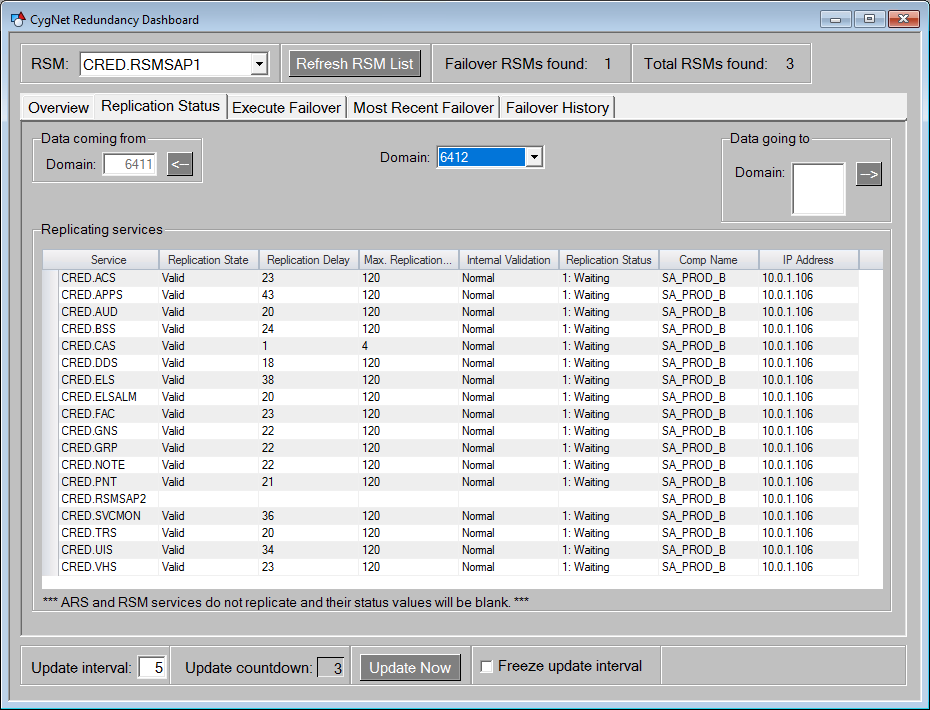
The Replication Status page contains the following elements:
| Object | Description |
|---|---|
|
Data coming from Domain box |
The source domain where the data is coming from. This will always only be a single domain. |
|
From Arrow button |
Click to navigate back and forth from the replicating source to the replicated destination in your replication path. |
|
Domain combo box |
Select the desired domain to view replicated services. |
|
Data going to Domain list box |
The destination domain where data is published to (the domain doing the pulling). This can be a list box showing all the domains where data is going. Data can be replicated to multiple domains. |
|
To Arrow button |
Click to navigate back and forth from the replicated destination to the replicating source in your replication path. |
|
Replicating services grid |
A Generic Grid object showing all the Replicating services for the selected domain. Any problems will be identified in red. The columns include:
Note: The ARS and RSM services do not replicate so their rows will be blank. |

